
Homepage
Use Home Page to control the main curated content on the public homepage.
This page is for homepage presentation and ordering. It does not create packages, countries, guides, or media. Create those records first, then select them here.
What you can edit
Section titled “What you can edit”| Section | Use it for |
|---|---|
| Hero | Homepage headline, subtitle, CTA, and background image. |
| Featured countries | Countries shown prominently on the homepage. |
| Country package sections | Country-specific package rows shown on the homepage. |
| Travel guide | Three guide/blog articles shown on the homepage. |
| Multi-country packages | Up to eight multi-country packages shown in the homepage carousel/filter area. |
Before you start
Section titled “Before you start”Prepare or confirm:
- Hero image is uploaded in Media.
- Packages are created and ready.
- Countries are created and active.
- Guide articles are created and ready.
- Multi-country packages have at least two countries assigned.
If an item is missing from a selector, check whether that package, country, or guide exists in its own admin section first.
Open the homepage editor
Section titled “Open the homepage editor”- Open Home Page from the left navigation.
- Click Refresh if you need the latest package, country, guide, or media options.
- Make your changes.
- Click Save home page.
- Open the public homepage and review the result.
Edit hero content
Section titled “Edit hero content”The hero has localized text and one shared background image.
For each language, edit:
- Title
- Subtitle
- Primary CTA label
- Primary CTA URL
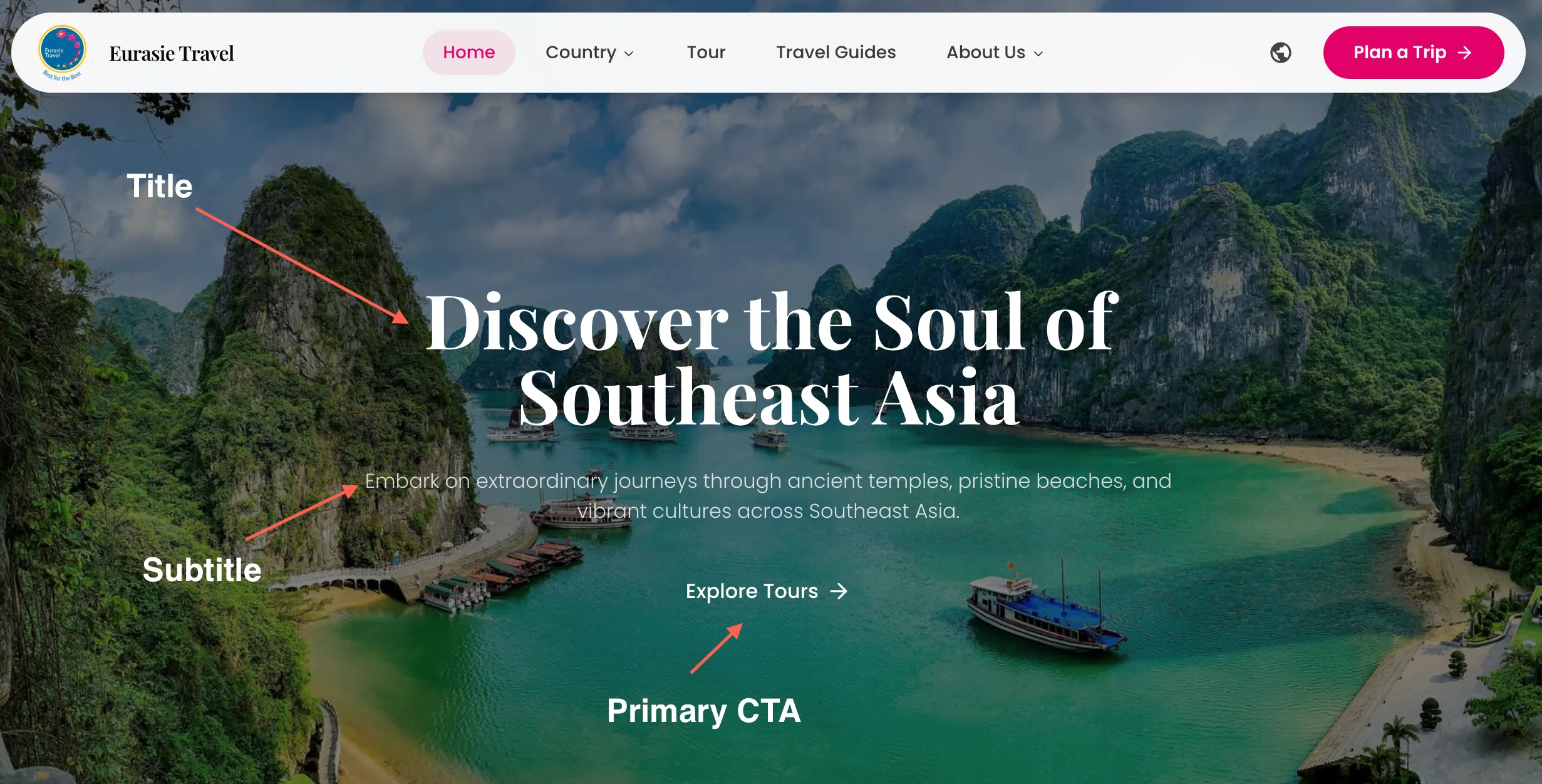
Recommended CTA URLs:
/en/tours/de/tours/it/tours/es/tours/ru/toursChange the hero background image
Section titled “Change the hero background image”- In the Hero section, open Hero background image.
- Choose an existing image or upload a new one.
- Confirm the image is selected.
- Click Save home page.
Use a strong landscape image. Avoid images that are too dark, blurry, or crowded behind text.
Edit featured countries
Section titled “Edit featured countries”After config country, all country will appear here. Featured countries appear first on the homepage in the saved order.
To add or remove a featured country:
- Find the country in Featured countries.
- Click the country card to select or unselect it.
- Use the up/down buttons to change the order.
- Click Save home page.
The number badge shows the saved display order.
Edit country package sections
Section titled “Edit country package sections”Country package sections show selected package cards for a country.
Each country section can show up to 3 packages.
To add a country section:
- Go to Country package sections.
- Open Add country section.
- Choose a country.
- Select up to 3 packages for that country.
- Click Save home page.
To hide a section without removing it:
- Find the country section.
- Click Hide.
- Click Save home page.
To remove a section:
- Find the country section.
- Click Remove.
- Click Save home page.
Removing the section does not delete the country or packages.
Edit multi-country packages
Section titled “Edit multi-country packages”The homepage multi-country section can show up to 8 packages.
To update it:
- Go to Multi-country packages.
- Open the package selector.
- Remove packages that should no longer appear.
- Click Save home page.
Edit travel guide articles
Section titled “Edit travel guide articles”The homepage travel guide section shows exactly 3 guide or blog articles.
To update it:
- Go to Travel guide.
- Open the guide selector.
- Select up to 3 articles.
- Remove articles that should no longer appear.
- Click Save home page.
If a guide is missing, check the Blog section and confirm the article exists.
Only packages with two or more countries appear in this selector.
Save changes
Section titled “Save changes”Homepage changes are not saved until you click Save home page.
Click Save home page after:
- Editing hero copy.
- Changing the hero image.
- Reordering featured countries.
- Adding or hiding country package sections.
- Changing selected package cards.
- Changing guide articles.
- Changing multi-country packages.
Review the public homepage
Section titled “Review the public homepage”After saving, open the public homepage and check:
- Hero text looks correct.
- CTA button points to the right page.
- Hero image loads and text is readable.
- Featured countries are in the right order.
- Country package sections show the right packages.
- Hidden sections do not appear.
- Travel guide articles are correct.
- Multi-country packages are correct.
- Mobile layout still looks good.
Common mistakes
Section titled “Common mistakes”| Mistake | Better action |
|---|---|
| Editing only English hero copy | Check other languages before launch. |
| Selecting a weak hero image | Use a clear landscape image with good text contrast. |
| Forgetting to save | Click Save home page after every set of changes. |
| Expecting missing packages to appear | Create or publish the package first, then refresh. |
| Selecting more than the section limit | Country sections allow 3 packages, guides allow 3, multi-country allows 8. |
| Removing a section by accident | Add the country section again and reselect packages. |